My Boo: A Halloween Font That’s Playful, Versatile, and Perfect for Spooky-Cute Designs
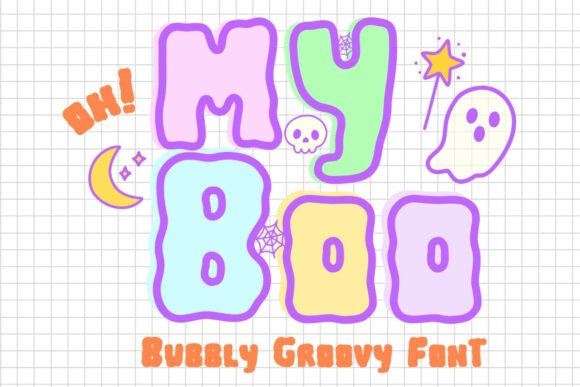
When it comes to Halloween-themed design projects, finding the right font can make all the difference. Enter My Boo — a bubbly, playful Halloween font that brings a kawaii twist to your creative work. Whether you're designing party invitations, digital stickers, or social media graphics, this font set offers both style and usability. It comes in two variations — solid and outline — and includes fun dingbat doodles like ghosts, pumpkins, and cats to enhance your spooky-cute aesthetic.
Designed for both beginners and experienced creators, My Boo is compatible with popular design platforms like Canva, Procreate, and Goodnotes. It’s an instant digital download, so you can start creating right away without any delays. But while this font offers a lot of value, there are a few common mistakes users tend to make that can affect the final outcome of their designs.
Common Mistakes When Using My Boo (And How to Avoid Them)
Even the best fonts can fall flat if used incorrectly. Here are some real-world issues designers face when working with My Boo — and how to sidestep them for better results.
1. Overusing the Dingbat Doodles
One of the standout features of My Boo is its collection of Halloween-themed dingbats. These little illustrations add charm and personality to your work. However, many users end up overloading their designs with too many icons, which can make layouts feel cluttered and unprofessional.
Better approach: Use the dingbats as accents rather than the main focus. For example, place a small ghost icon next to a heading or use a pumpkin graphic as a bullet point in a list. This keeps your design clean while still embracing the playful Halloween spirit.
2. Not Checking Platform Compatibility
My Boo works beautifully in Canva, Procreate, and Goodnotes, but not all design tools handle downloadable fonts the same way. Some users assume the font will work seamlessly in every application, only to find formatting issues or missing characters later.
Better approach: Before diving into a big project, test the font in your preferred software. Create a simple sample layout to ensure all characters and styles display correctly. If you're using it in a program that doesn’t support custom fonts (like some free web tools), consider creating your text in a compatible editor and exporting it as an image.
3. Ignoring Line Spacing and Kerning
The bubbly, rounded style of My Boo makes it fun and readable — but only if you adjust the spacing properly. Some users overlook line spacing and kerning, leading to text that feels cramped or hard to read.
Better approach: Give your text some breathing room. Increase the line height slightly, especially when using the outline version, which can appear lighter on the page. Adjust the kerning between letters to avoid awkward gaps or crowded areas, especially in headlines.
4. Using It for the Wrong Tone or Audience
While My Boo is perfect for Halloween parties, children’s crafts, or lighthearted branding, it’s not ideal for more formal or serious applications. Some users mistakenly apply it to professional materials like business reports or academic presentations, which can undermine the tone.
Better approach: Reserve My Boo for playful, seasonal, or creative projects where a whimsical vibe is appropriate. If you're designing for a more mature or corporate audience, consider using it sparingly — for example, in a themed header or event title — rather than for large blocks of text.
What to Check Before Downloading or Using My Boo
Before you hit that download button, take a moment to verify a few key details that can impact your experience with My Boo.
- License Type: Make sure the font includes a commercial use license if you're planning to sell items that feature it (like T-shirts, mugs, or digital stickers).
- Character Set: Check that the font supports all the characters you need — especially if you're writing in multiple languages or using special symbols.
- File Format: Most digital fonts come in .OTF or .TTF. Confirm that the file type is compatible with your design software.
- Support and Updates: Look for a seller or designer who offers customer support and occasional updates to ensure long-term usability.
How to Get the Most Out of My Boo
Once you’ve downloaded and installed the font, here are a few practical tips to help you use it more effectively:
- Pair It with a Simple Font: To maintain visual balance, pair My Boo with a clean sans-serif or minimalist script font for supporting text.
- Use Layering for Depth: Try layering the solid and outline versions of the font to create a double-text effect that adds visual interest.
- Stick to Contrasting Backgrounds: Because of its playful style, My Boo works best on light or neutral backgrounds. Avoid using it on busy or dark patterns that might make it hard to read.
- Test Print Output: If you're using the font for printed materials, always print a sample first. The outline version may look great on screen but can be faint or inconsistent on paper depending on the printer quality.
Final Thoughts
My Boo is a fantastic Halloween font that brings both charm and functionality to your design toolkit. Whether you're a hobbyist creating DIY crafts or a small business owner designing seasonal marketing materials, this font offers a fun and flexible way to stand out.
By avoiding common pitfalls like spacing issues, overuse of icons, and platform compatibility problems, you can ensure your designs look polished and professional. And by understanding what to check before downloading, you’ll save time and avoid frustration down the line.
So go ahead — download My Boo and let your creativity shine. With the right approach, this bubbly, retro-inspired font can elevate your Halloween-themed projects and bring a touch of spooky-cute magic to everything you create.