Senior Junior: A Friendly Font for Modern Design
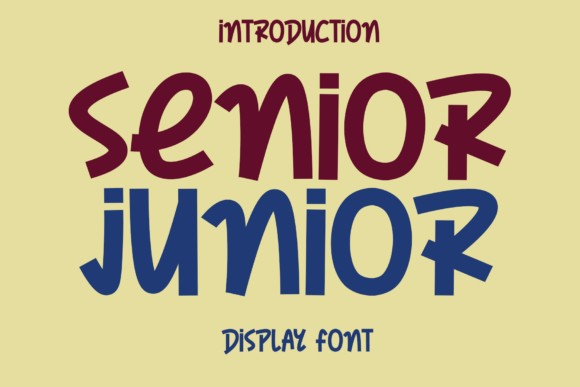
Typography plays a vital role in how your message is received. Senior Junior stands out as a font that balances simplicity with personality. Its clean lines and subtly rounded edges give it a modern yet approachable feel, making it a versatile choice across many design contexts.
What Makes Senior Junior Unique
Suitable for both print and digital formats, Senior Junior is crafted to feel like a natural extension of handwritten expression—without sacrificing clarity. Its balanced letterforms and polished finish help maintain readability while adding warmth to the text.
Unlike many casual fonts that lean too heavily into whimsy, Senior Junior maintains a crisp structure. This makes it ideal for designers who want to convey friendliness without compromising professionalism.
Design Characteristics
- Clean, modern lines that avoid visual clutter
- Subtle rounding on letter edges for a soft, inviting look
- Even spacing that enhances readability at various sizes
- Handwritten inspiration with a refined finish
Where to Use Senior Junior
This font shines in environments where clarity and warmth are both important. Here are a few common applications where Senior Junior can make a strong impact:
- Brand identities – especially lifestyle, wellness, and creative businesses
- Website headers – to add personality without overwhelming screen readability
- Packaging design – from food labels to boutique products
- Social media visuals – for captions and promotional graphics
- Editorial layouts – including newsletters, zines, and digital magazines
Customizing Senior Junior for Different Styles
While Senior Junior has a distinct personality, it adapts well to various tones and aesthetics. By adjusting layout, color, and supporting typography, you can guide how the font is perceived.
- Pair it with serif fonts for a nostalgic, editorial feel
- Combine with bold sans-serif type for contrast and modernity
- Use in monochrome layouts for minimalist appeal
- Enhance with soft pastels or natural tones for a gentle, organic vibe
Real-World Examples
Here are a few practical scenarios where Senior Junior can elevate your design:
- A local bakery using the font on packaging and social media to create a warm, homemade impression
- A freelance illustrator incorporating Senior Junior into a portfolio site to reflect creativity and approachability
- An educator creating handouts that feel more personal and less rigid than standard fonts
- A small business owner designing email newsletters that feel conversational and engaging
Design Tips for Best Results
To get the most out of Senior Junior, keep these design principles in mind:
- Use appropriate sizing – it works well as a headline font but may lose impact if used too small
- Limit competing elements – its simplicity shines when given space to breathe
- Ensure contrast – especially when used on textured or colored backgrounds
- Test across platforms – verify legibility on both mobile and desktop screens
Who Can Benefit from Using Senior Junior
Whether you're a seasoned designer or just starting out, Senior Junior offers flexibility that suits a wide range of users:
- Marketers – Use it to humanize brand messaging and connect with audiences
- Bloggers – Enhance your site’s personality without sacrificing readability
- Entrepreneurs – Stand out with a font that feels professional yet personable
- Hobbyists – Easily apply it to DIY projects like greeting cards, planners, or digital art
- Educators – Make learning materials feel more approachable and engaging
Staying Consistent Across Projects
When using Senior Junior across multiple platforms or design pieces, consistency is key. Stick to a defined color palette, spacing system, and complementary font pairings to maintain a cohesive look.
Consider creating a simple style guide for your project—especially if you're working with a team or across multiple deliverables. This helps ensure the font’s character remains intact, no matter where it appears.
Why Senior Junior Works for Digital Content
In the fast-paced world of online communication, readability and visual appeal go hand in hand. Senior Junior strikes a balance that works well for digital content:
- It’s easy on the eyes during long reads
- It brings a personal touch to digital platforms that often feel generic
- It adapts well to responsive layouts and variable screen sizes
Getting Started with Senior Junior
If you're new to using this font, start small. Try it in a single section of your design—like a headline or callout text—and see how it influences the overall tone. As you become more comfortable, you can expand its use to headers, subheadings, or even short blocks of body text.
Many design tools and platforms support Senior Junior, making it easy to integrate into your workflow. Whether you're using Adobe Creative Suite, Figma, or a web builder like Webflow or Squarespace, you’ll find it simple to implement.
Final Thoughts
Sometimes, the best design choices are the ones that feel intuitive. Senior Junior offers a balance of clarity and charm that makes it a go-to for designers who want to add warmth without losing structure. Whether you're building a brand identity, crafting digital content, or working on print materials, this font brings a human touch that resonates with audiences.