Looping: The Curly Font That Adds Energy to Every Design
Why Looping Stands Out in a Crowd of Typefaces
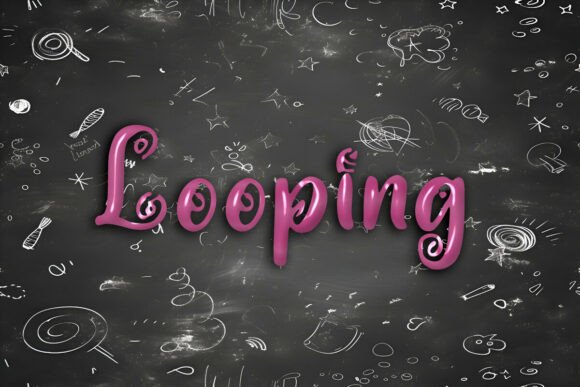
If you’ve ever scrolled through a design marketplace or browsed fonts for a creative project, you know how easy it is to feel overwhelmed by options. Looping breaks through the noise with its playful curves and lively character. It’s not just another decorative font—it’s a design tool that brings energy to everything from t-shirts to digital graphics. Whether you're a small business owner crafting a brand identity or a hobbyist making personalized gifts, Looping offers a unique blend of style and versatility.
What makes Looping especially appealing is its adaptability. It works beautifully in both print and digital formats, making it ideal for SVG art, greeting cards, social media visuals, and even Cricut projects. Its whimsical appearance doesn’t sacrifice readability, which is key when you want your message to pop without confusing your audience.
Common Missteps When Using Looping
Despite its charm, Looping isn’t foolproof. Many designers—especially beginners—fall into predictable traps that can undercut the font’s effectiveness. One of the most common mistakes is using Looping for long blocks of text. While its curls and loops are eye-catching, they can become distracting when used excessively. Think of Looping as a supporting actor rather than the lead—perfect for headlines, logos, or short phrases, but not for body copy.
Another oversight is ignoring spacing and kerning. Looping’s playful nature means letters often connect or overlap slightly. If not adjusted properly, this can cause readability issues or visual clutter. Always preview your text at different sizes and distances, especially if it’s going on a t-shirt or poster where clarity matters.
Choosing the Right Format: Free vs. Paid Versions
When downloading Looping, many users jump for the free version without checking what they’re actually getting. Some free fonts lack the full character set, missing punctuation, accents, or special symbols. Others may not include stylistic alternates or ligatures that give Looping its unique flair. If you're designing for a brand or a product that needs polish, investing in a premium version is often worth it.
Also, be mindful of licensing restrictions. A font that’s free for personal use may not be allowed for commercial purposes. Always double-check the license before using Looping in client work or products you plan to sell. Ignoring this detail can lead to legal issues down the line.
How to Avoid Design Disasters with Looping
To get the most from Looping, start by pairing it with simpler, more neutral fonts. For example, use Looping for a headline and pair it with a clean sans-serif like Arial or Helvetica for supporting text. This contrast keeps your design dynamic without overwhelming the viewer.
Also, consider color contrast. Looping’s intricate lines can get lost on busy or dark backgrounds. Test your color combinations in different lighting conditions and on different devices to ensure readability across platforms. A bright background with a bold outline can make all the difference in making your text stand out.
Maximizing Looping for Cricut and SVG Projects
One of Looping’s biggest strengths is how well it translates to craft projects. If you're using Looping for Cricut or SVG files, make sure the font is properly converted to outlines before cutting. This ensures the design stays intact even if the machine doesn’t recognize the font.
Another common issue is not adjusting line spacing when layering text in multi-color projects. Without proper spacing, your letters may bleed into each other or look cramped. Take time to fine-tune each layer for a polished, professional result.
What to Check Before Downloading or Buying Looping
Before you commit to a version of Looping, ask yourself a few key questions:
- Does the font include all the characters I need, including numbers and punctuation?
- Is it optimized for both screen and print use?
- What’s the licensing agreement—can I use it for commercial work?
- Are there alternate characters or ligatures included for customization?
Checking these points ensures you're not only getting a quality font but also one that fits your specific project needs. Don’t be swayed by flashy previews—always test the font in your actual design before finalizing your choice.
Real-World Examples of Looping Done Right
Consider a local bakery that wanted to refresh its packaging and social media presence. They chose Looping for their logo and tagline because it gave their brand a warm, friendly vibe. But instead of using it for all text, they paired it with a simple, readable font for descriptions and ingredients—keeping the design cohesive and functional.
Another example is a digital creator using Looping for Instagram story headers. By adjusting the font size and adding a subtle drop shadow, they ensured the text remained legible on mobile screens while still standing out visually. It’s all about balance and knowing when to let Looping shine without overdoing it.
Final Thoughts: Looping Is More Than Just a Pretty Font
Looping isn’t just about aesthetics—it’s about enhancing your message with personality and precision. When used thoughtfully, it can elevate your designs and help your brand or project stand out in a crowded space. But like any design tool, it requires care and intention to avoid missteps.
By understanding its strengths, avoiding common mistakes, and using it strategically, you’ll unlock Looping’s full potential. Whether you’re printing stickers, designing a logo, or creating digital art, this curly font is more than just a trend—it’s a versatile addition to your creative toolkit.