Magic Outline: A Practical Font for Modern Workflows
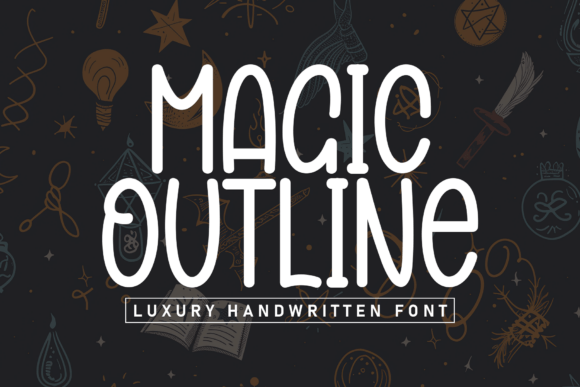
When it comes to visual communication, typography plays a critical role in shaping how information is perceived. Magic Outline is a casual and neat display font that merges simplicity with a warm, approachable tone. Its clean lines, balanced letterforms, and subtly rounded edges make it an excellent choice for designers and creators who want to convey clarity and charm without sacrificing personality.
Unlike overly formal or stylized fonts, Magic Outline strikes a balance between professionalism and friendliness. It’s particularly well-suited for branding, headlines, packaging, and digital content where a human touch enhances engagement. Whether you're designing a website, crafting marketing materials, or creating social media assets, this font can become a consistent and recognizable element in your communication toolkit.
Integrating Magic Outline into Design and Content Workflows
In practical terms, Magic Outline fits naturally into various stages of a creative or business process. Before a project begins, it can help define the tone of a brand or message. During execution, it supports visual consistency across deliverables. And in post-production or publishing phases, it contributes to a polished, cohesive output.
For example, a small business owner launching a new product might use Magic Outline in early concept mockups to establish a warm and inviting brand identity. As the project progresses, the same font can be applied consistently across packaging, promotional banners, and email newsletters. This kind of continuity not only reinforces brand recognition but also streamlines the design process by reducing the need to juggle multiple typographic styles.
Compatibility and Usability Across Platforms
One of the strengths of Magic Outline is its versatility. It works well across digital and print mediums, and its crisp structure ensures legibility even at smaller sizes. Whether used in Adobe Creative Suite, Figma, Canva, or Google Docs, the font maintains its clarity and character.
For web developers and UI designers, Magic Outline can be embedded using standard web font protocols. Its compatibility with modern CSS techniques means it can be scaled responsively without losing quality. When integrating into a website or app, consider using it for headlines, call-to-action buttons, or feature highlights where a friendly tone enhances user experience.
For print designers, the font’s rounded edges and open spacing make it ideal for packaging labels, greeting cards, and children’s books—areas where approachability and readability are equally important. In these contexts, Magic Outline can be paired with a more structured sans-serif or serif font for body text, creating a visual hierarchy that guides the reader naturally through the content.
Workflow Examples and Practical Implementation
Let’s take a look at a few real-world scenarios where Magic Outline can be effectively implemented:
- Brand Identity Design: Use Magic Outline in logo variations or supporting brand assets to convey a personable and modern image. Pair it with a clean sans-serif for a balanced visual identity system.
- Social Media Graphics: Apply it in quote images, event announcements, or product launch teasers where a warm, handwritten feel adds emotional resonance.
- Educational Content: Teachers and content creators can use the font in presentation slides or handouts to make learning materials feel more engaging and less rigid.
- Freelance Portfolios: Freelancers in creative fields like photography, illustration, or copywriting can use Magic Outline to highlight project titles or testimonials on their websites.
Each of these examples shows how Magic Outline can be woven into different workflows without disrupting the overall design or messaging strategy. Its adaptability makes it a reliable choice for both one-time projects and long-term brand applications.
Ensuring Consistency and Quality Over Time
As with any design asset, maintaining consistency is key to building trust and recognition. When using Magic Outline across multiple platforms and deliverables, it’s important to establish a clear usage guide. This can include rules about font sizes, spacing, color pairings, and acceptable variations (such as bold or italic styles if available).
For teams or organizations, creating a shared design system that includes Magic Outline ensures that everyone—from marketers to developers—uses the font in a way that aligns with brand standards. Tools like Figma’s design tokens or Adobe’s Creative Cloud Libraries can help maintain typographic consistency across projects and team members.
Additionally, when licensing Magic Outline, verify that it includes the necessary permissions for your intended use, especially if you're planning to use it in commercial products or across multiple platforms. Some fonts come with different licensing tiers for personal, business, or enterprise use, so it’s important to choose the right package to avoid compliance issues later.
Long-Term Value and Adaptability
Typography trends come and go, but fonts that balance aesthetics with functionality tend to have staying power. Magic Outline’s clean yet expressive design makes it suitable for both current and future applications. As digital interfaces evolve and design systems become more modular, having a font that can adapt across contexts becomes increasingly valuable.
For long-term branding efforts, consider how Magic Outline fits within your broader visual language. Does it complement your color palette? Does it work well across different screen sizes and formats? Testing the font in multiple environments—such as mobile apps, print ads, and video titles—can help ensure it remains effective as your needs change over time.
Final Thoughts on Implementation
Magic Outline isn’t just a font; it’s a tool that supports clarity, warmth, and consistency in visual communication. By integrating it thoughtfully into your workflow—whether you're designing a logo, crafting a presentation, or updating a website—you can enhance the emotional tone of your content without sacrificing professionalism.
As you begin to explore how Magic Outline can fit into your own creative or business process, remember to approach it with the same level of planning and intentionality as any other design decision. Evaluate its compatibility with your tools, test it in different contexts, and document its use to ensure long-term success.
When used strategically, Magic Outline becomes more than a stylistic choice—it becomes a functional part of your design ecosystem, helping you communicate more effectively and connect more deeply with your audience.